

A d4.group case study on replatforming a U.S. home-health brand from WordPress to Shopify, with a full redesign, a rebuilt operational stack, and no loss of search equity.
At a glance
| Client | SonoHealth, a U.S. home-health device and supplement brand (audience 40+) |
| Project | Full WordPress to Shopify replatform, redesign, and operations rebuild |
| Scope | 21 products, 40 pages, 330 blog posts with comments |
| Timeline | ~2 months for design and development |
| Outcome | 3%+ conversion, sales from month one, SEO preserved and improved |
The client
SonoHealth is an established U.S. brand in home health, not a dropshipping side project. Its mission is in the tagline: putting the future of healthcare in your hands, helping people monitor their health at home and rely on the clinic less often.
The catalog serves two needs for an audience that skews 40 and older:
- Home monitoring devices: the BPpro and BPMAX blood pressure monitors, a pulse oximeter, the EKGraph portable EKG monitor (AFib detection), a fetal doppler, an infrared thermometer, a nebulizer, and a HEPA air purifier with UV-C.
- Supplements: Spectrum 5 multi-form magnesium, BioBloom women’s probiotics, and a detox formula.
What makes this harder than a typical store is the ecosystem around the site. There is a blog engine with 330 posts, a separate community forum, a support desk, iOS and Android apps, a subscription program, and a set of trust markers (FDA-Cleared, 2-Year Warranty, 60-Day Free Trial, Made in USA). The brand spent years building this content and its search reputation.
So the migration was never about moving 20 product cards. It was about moving a mature brand, with all of its SEO equity and content, without dropping anything along the way. The cost of getting it wrong is losing traffic that took years to earn.
The challenge: why leaving WordPress
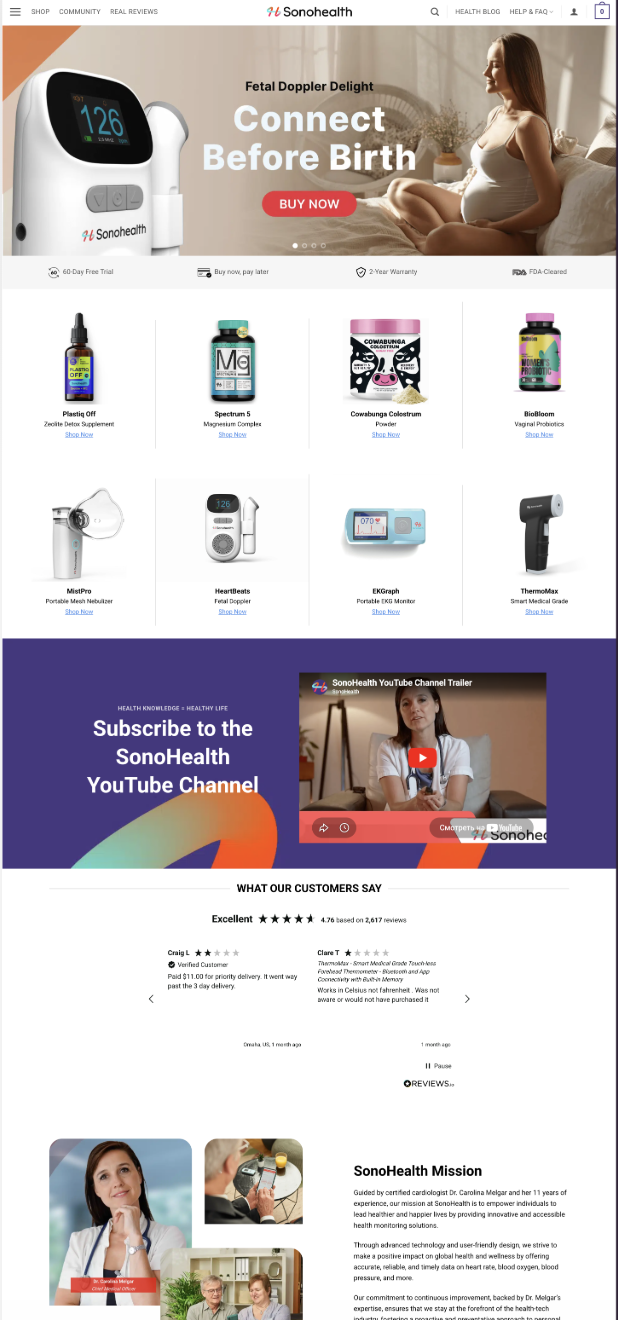
The old SonoHealth site was built in a hurry, and it carried the full set of problems we see on WordPress and WooCommerce stores that have outgrown the platform. If you run on WP today, some of this will sound familiar.
Slow load times. A heavy theme, a stack of plugins, and unoptimized images. For a health brand that hurts twice: it erodes visitor trust, and it costs rankings, since Google favors faster sites.
Plugin dependency, and why Shopify avoids it. Shopify is not plugin-free. It has plenty of apps, and you pay monthly for some of them. The difference is in the foundation. On WooCommerce, plugins hold up everything, including the core of commerce: WooCommerce itself is a plugin, with a dozen more on top of it for payments, cart, security, and caching. One conflict or one abandoned plugin can break or expose the whole storefront. On Shopify, the critical base (hosting, speed, security, PCI, checkout, payments) is built into the platform and depends on no app at all. Apps sit on top of that base, go through review, and run sandboxed, so a single app cannot take the store down. You pay either way, but on Shopify you are not betting the store every time something updates.
Updates that break the site. The WordPress core, the theme, and every plugin update separately and at any time. One update can take down the storefront or break checkout, and you might only notice when sales drop.
Security on you. WordPress is the most attacked CMS in the world, largely because of its popularity and plugins. For a store that takes payments and stores customer data, that is a constant front: patching, backups, monitoring, bot defense, spam.
Hosting, backups, SSL, PCI: also on you. On WP you own the server, its performance under load, your backups, your certificates, and payment compliance. A sale or a traffic spike can simply knock the site offline.
A weak checkout. WooCommerce checkout depends on plugins and the theme, and it often turns clunky, losing buyers at the final step.
Developer dependency. Every small edit runs through someone with code access. The owner does not really own the site.
Inconsistent design. Different fonts, spacing, and styles from page to page. The site read like a patchwork instead of one premium brand.
The client wanted a platform that removes this entire class of problems, not one that patches them one at a time.
The one question every owner asks
When you tell a business owner you are changing platforms, the first question is always the same: will I lose my Google traffic?
It is a fair fear. SonoHealth had years of accumulated SEO equity, hundreds of indexed pages and posts driving steady organic traffic. A careless move loses that in a week. Shopify imposes its own URL structure (/products/, /collections/, /pages/, /blogs/), old URLs stop existing, Google starts returning 404s, and rankings reset.
That is why we started with SEO, not design.
The approach
We ran the WordPress to Shopify migration to a fixed sequence, not by improvisation: Audit, Map, Migrate, Validate, Optimize.
- Audit. Export and inventory the entire old site: products, pages, posts, URL structure, metadata.
- Map. Build a table that matches every old address to a new one on Shopify.
- Migrate. Move data and content in bulk through Matrixify, with no manual copy-paste.
- Validate. Check every record, confirm the redirects, verify indexing.
- Optimize. Speed up the site, clean up SEO and UX.
1. SEO migration: a 1:1 redirect map
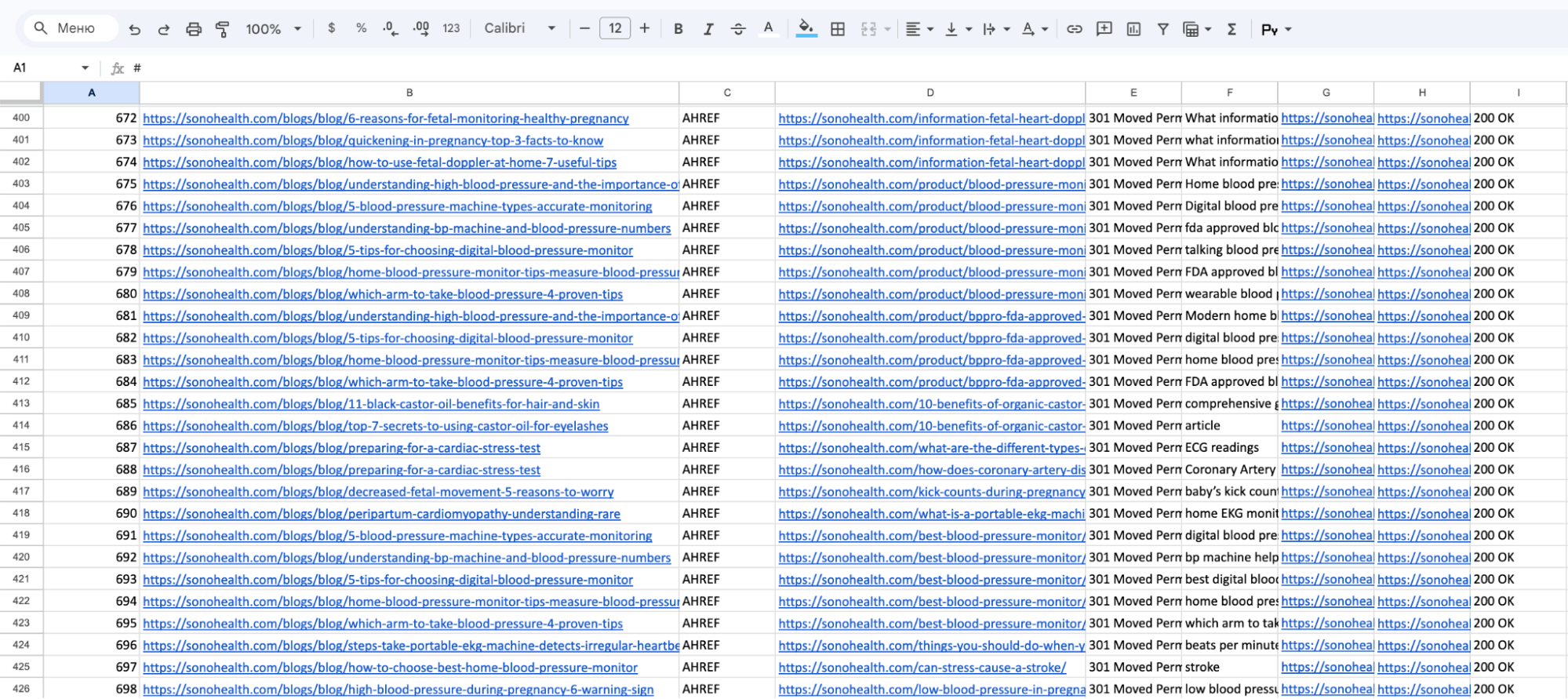
Before moving anything, we collected every URL on the old site into a single migration table and matched each old address to a new one on Shopify:
old URL → new URL → page type → redirect status
Then the part that protects the rankings: a 301 redirect on every old address. To Google, a 301 says “this page did not disappear, it moved here,” and the search equity transfers to the new URL. Zero lost pages, zero 404s, one-to-one mapping.
After launch we submitted a fresh sitemap in Google Search Console, confirmed indexing of the new URLs, and verified that rankings held. Some queries even improved on the faster site.
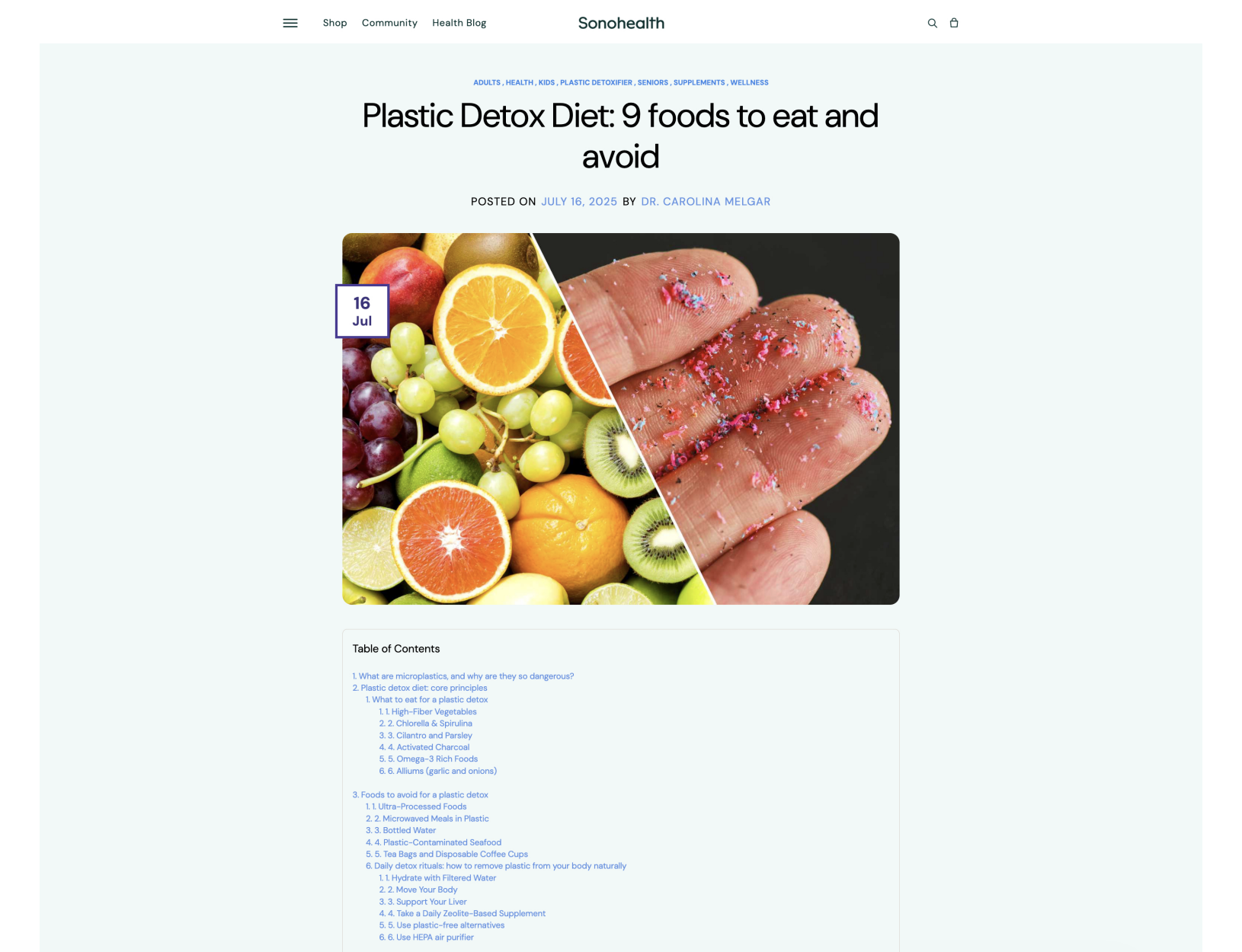
2. The blog: 330 posts, comments included
This is where a lot of agencies cut corners, and it is one of the parts of this project we are proudest of. Blogs often get lost in a migration or moved badly, without comments or formatting.
For SonoHealth the blog is not a side feature. It is the main organic channel. Posts on microplastics, detox, and health bring in the 40+ readers from search who later buy the devices. Lose them and you cut off the top of the funnel.
What we did:
- Moved all 330 posts in bulk through Matrixify, preserving text, images, dates, and URLs.
- Kept the post structure, including the table-of-contents layout.
- Solved the comments separately. Shopify’s native blog handles comments poorly, so we added Better Blog Comments and migrated the full discussion history under each post.
- Set a 301 redirect on every post, so no link from search or an external site lands on an empty page.
For the reader and for Google, the blog moved invisibly. All content is in place, the comment history is in place, and the rankings held.
3. Catalog, variants, and badges
Twenty-one products sounds small, but the detail is in the variants. Several devices have configurations and options that had to move and be reconfigured so nothing shifted and analytics counted correctly per variant.
We also built a badge system on the product cards through GSC Product Labels & Badges: Sale, New, FDA-Cleared, and other trust markers. For a health brand that is a direct conversion driver, since the shopper sees reliability signals before the click.
Product pages built for each device type
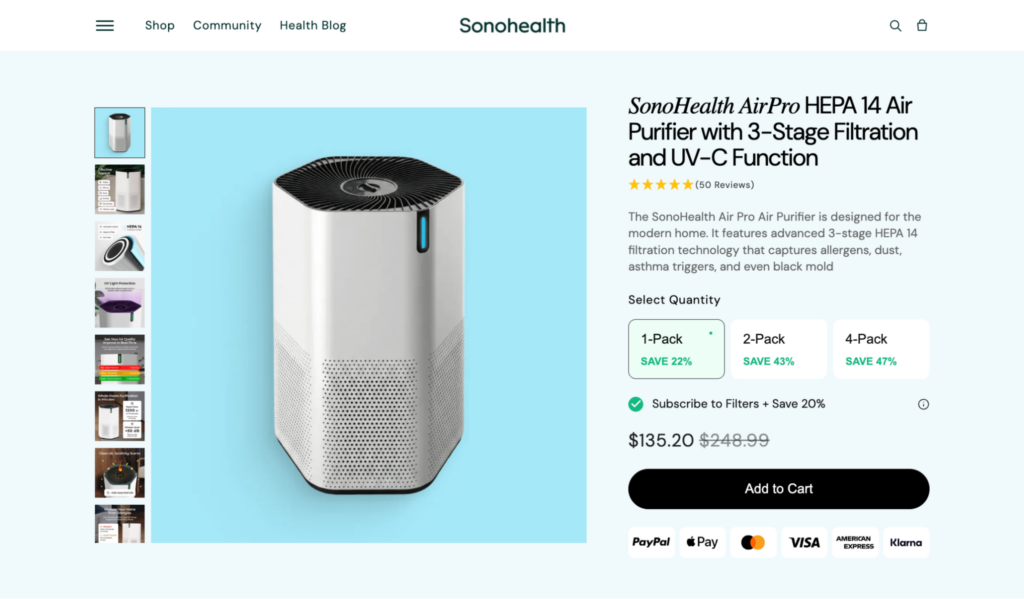
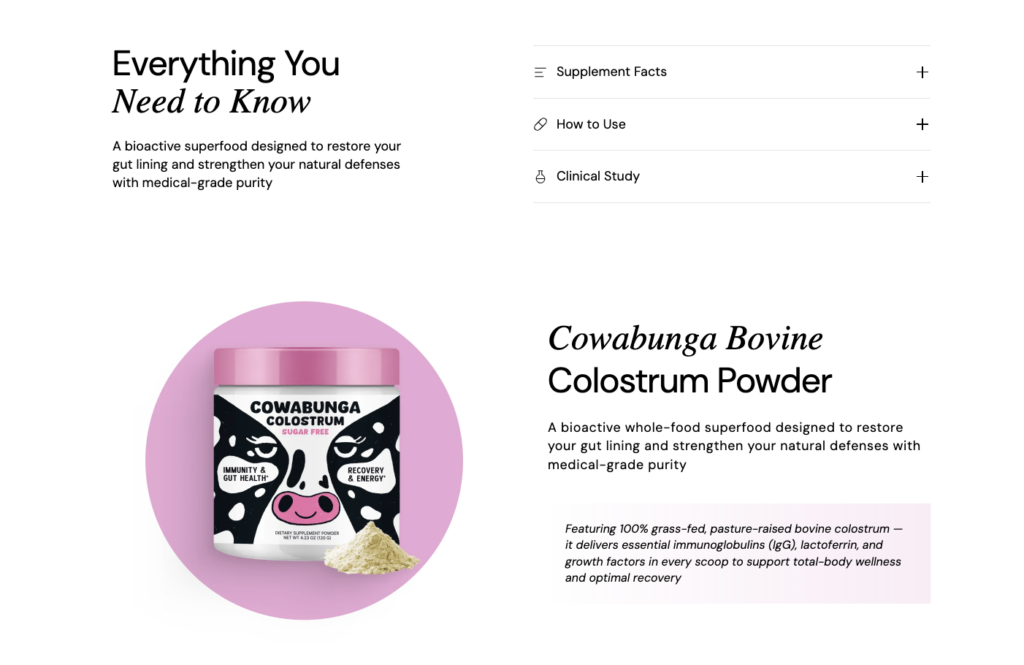
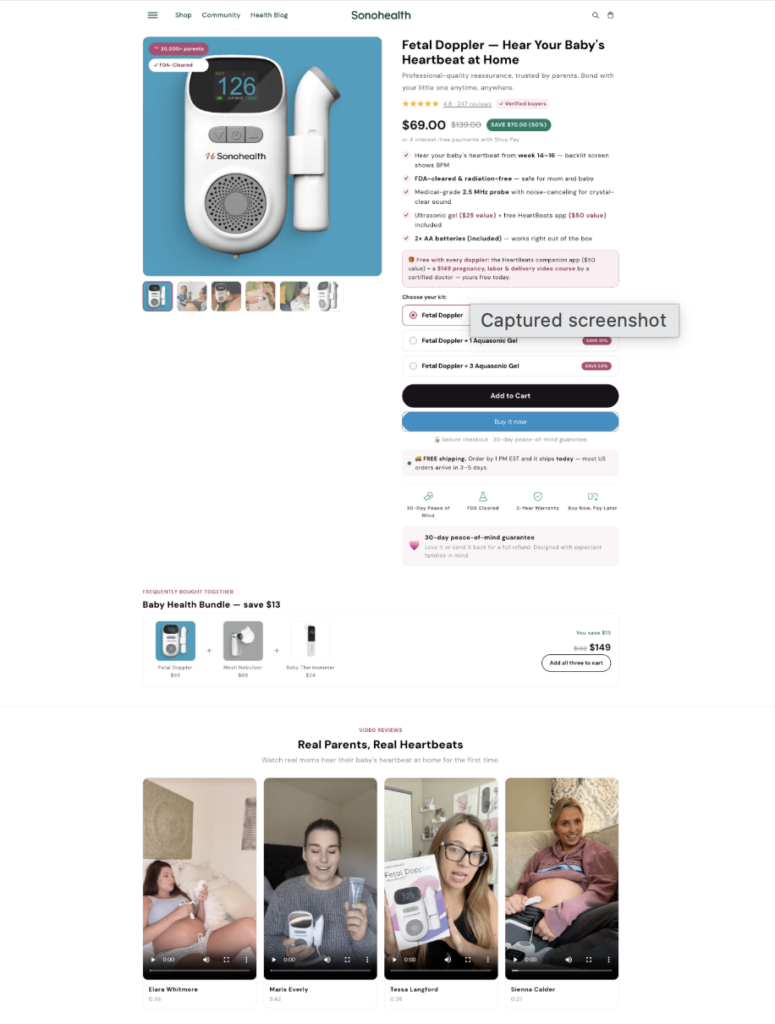
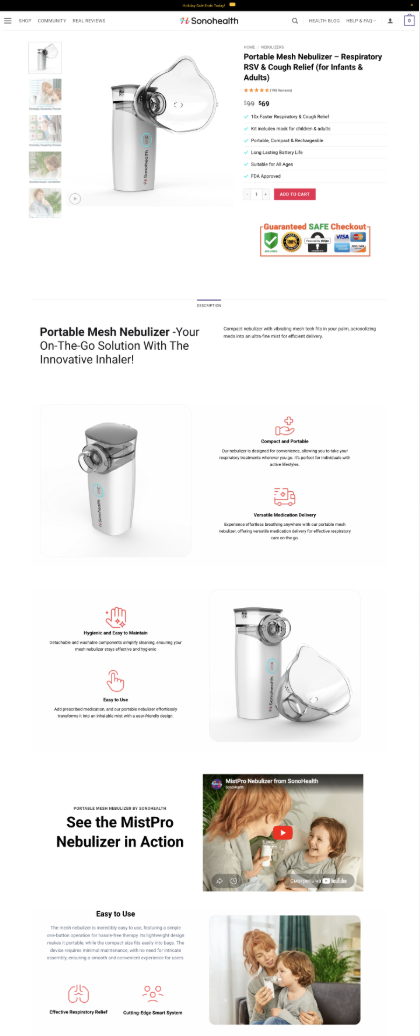
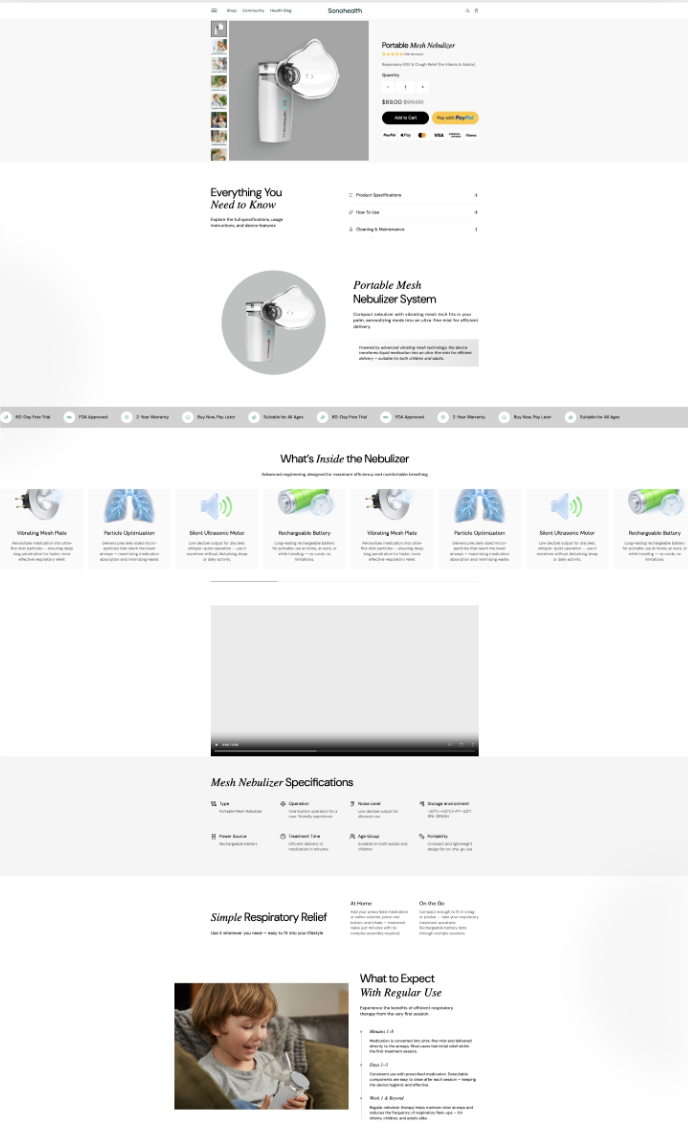
Product detail pages (PDPs) could not run off one template, because the devices sell differently. A blood pressure monitor needs to show FDA clearance, accuracy, dual-user mode, and reading memory. A nebulizer needs portability, quiet operation, and use cases. A fetal doppler needs safety, gestational timing, and instructions. A supplement needs ingredients, magnesium form, bioavailability, and the subscription option.
So we built a flexible PDP system: one design language and a shared library of sections, with each page assembled from its own set of blocks for that product. The principle is consistent across the catalog, but the content is specific, so each page shows exactly what sells that device and nothing filler. Technically this runs on metafields (more in the development section), and the client can reassemble cards in the Shopify editor without a developer.
Scope note: a deliberate clean start on accounts
The value of the old site was in SEO, content, and catalog, and that is what we moved with precision (URLs, 301s, 330 posts with comments, products, pages). We chose not to migrate customer accounts and order history, and started clean instead. That removed the risk of moving passwords and personal data, kept the database free of clutter, and gave clean analytics from day one. It did not affect sales: the store began converting immediately.
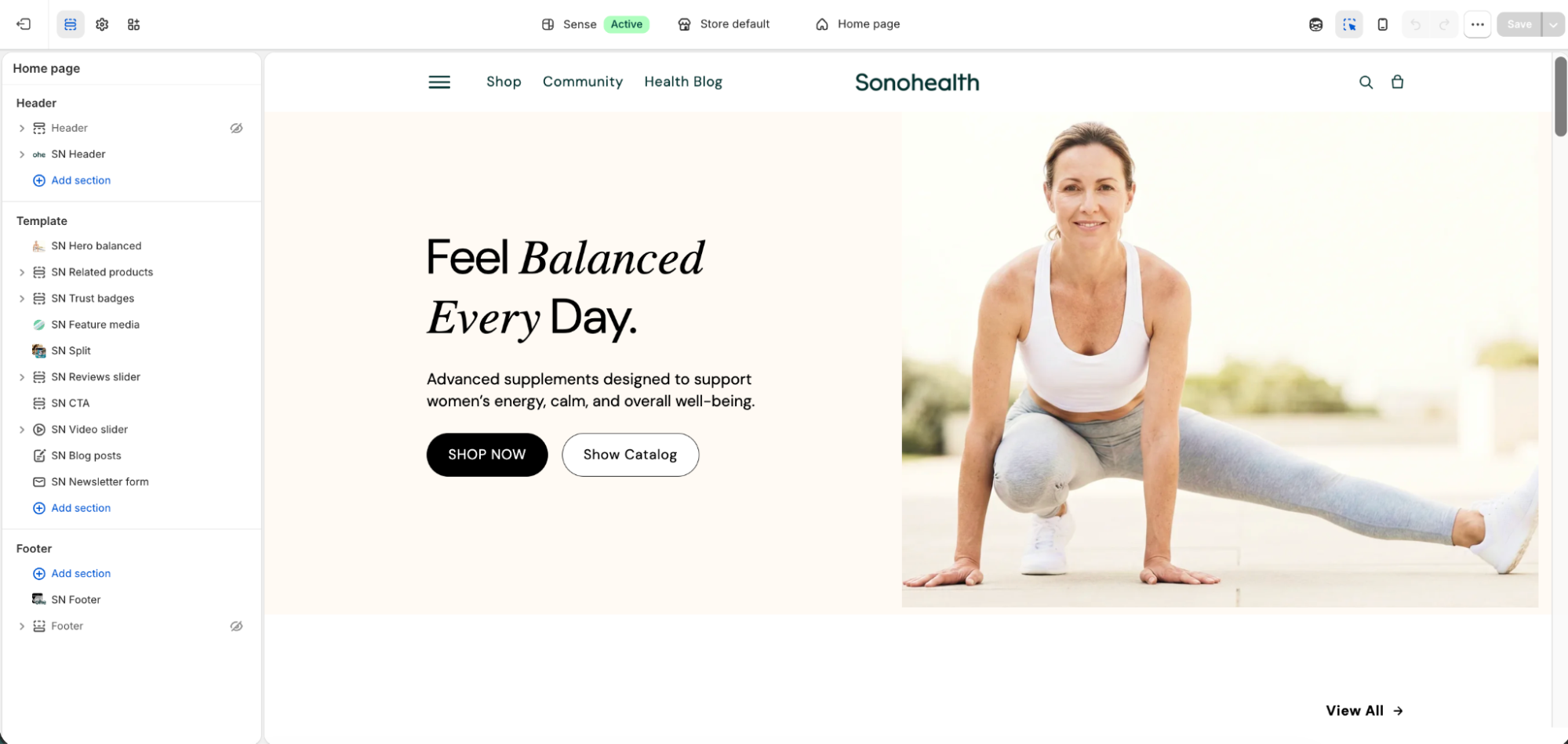
4. The redesign on a Dawn base
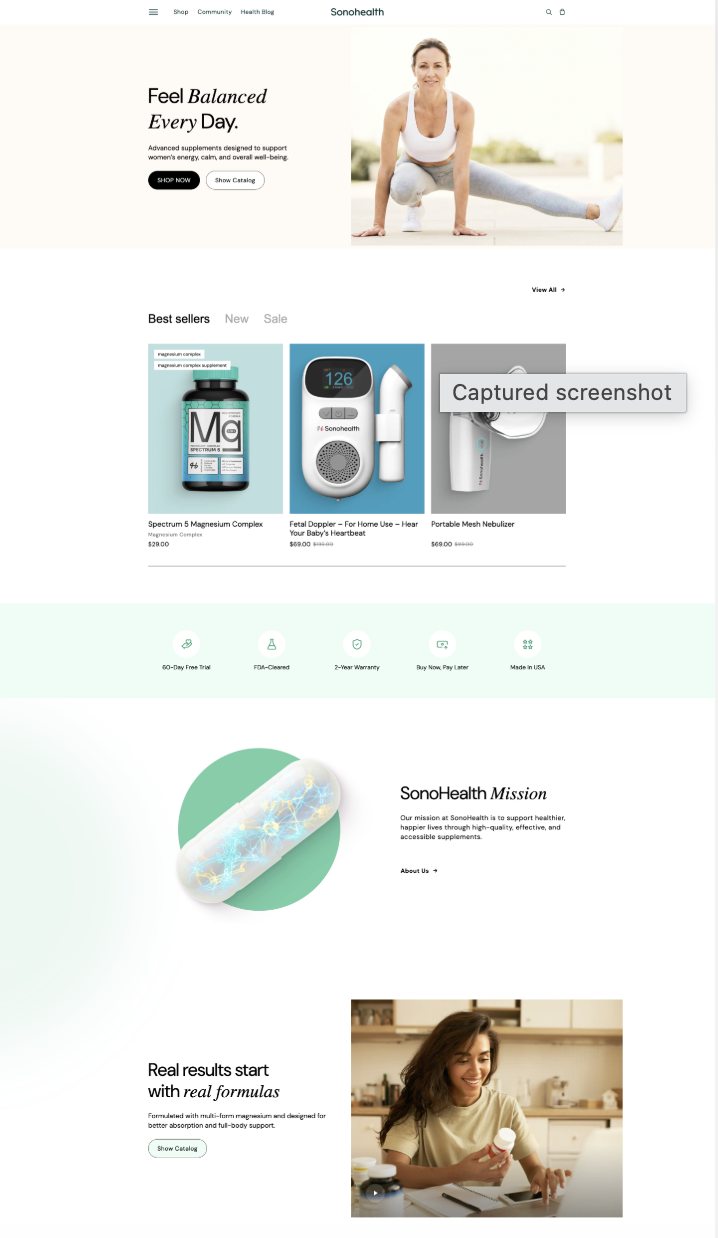
The redesign ran in parallel with the migration. The goal was not “make it pretty,” it was to turn a patchwork site into one premium health brand that people trust with their health.
Base: the Dawn theme. We built on Shopify’s official free theme. That was a deliberate engineering choice. Dawn is fast, natively supported by Shopify, and carries none of the abandonment risk of a third-party paid template. It gave us a fast, solid base to build the custom brand design on top of.
A new color system. The old palette was random and inconsistent. We built a single color system for a health brand: a calm, clean base that reads as clinical and reliable, and a warm accent for buttons and key actions that pulls the eye toward purchase. Trust colors (badges, guarantees) became their own accent markers. The palette now works for two things at once, trust and conversion.
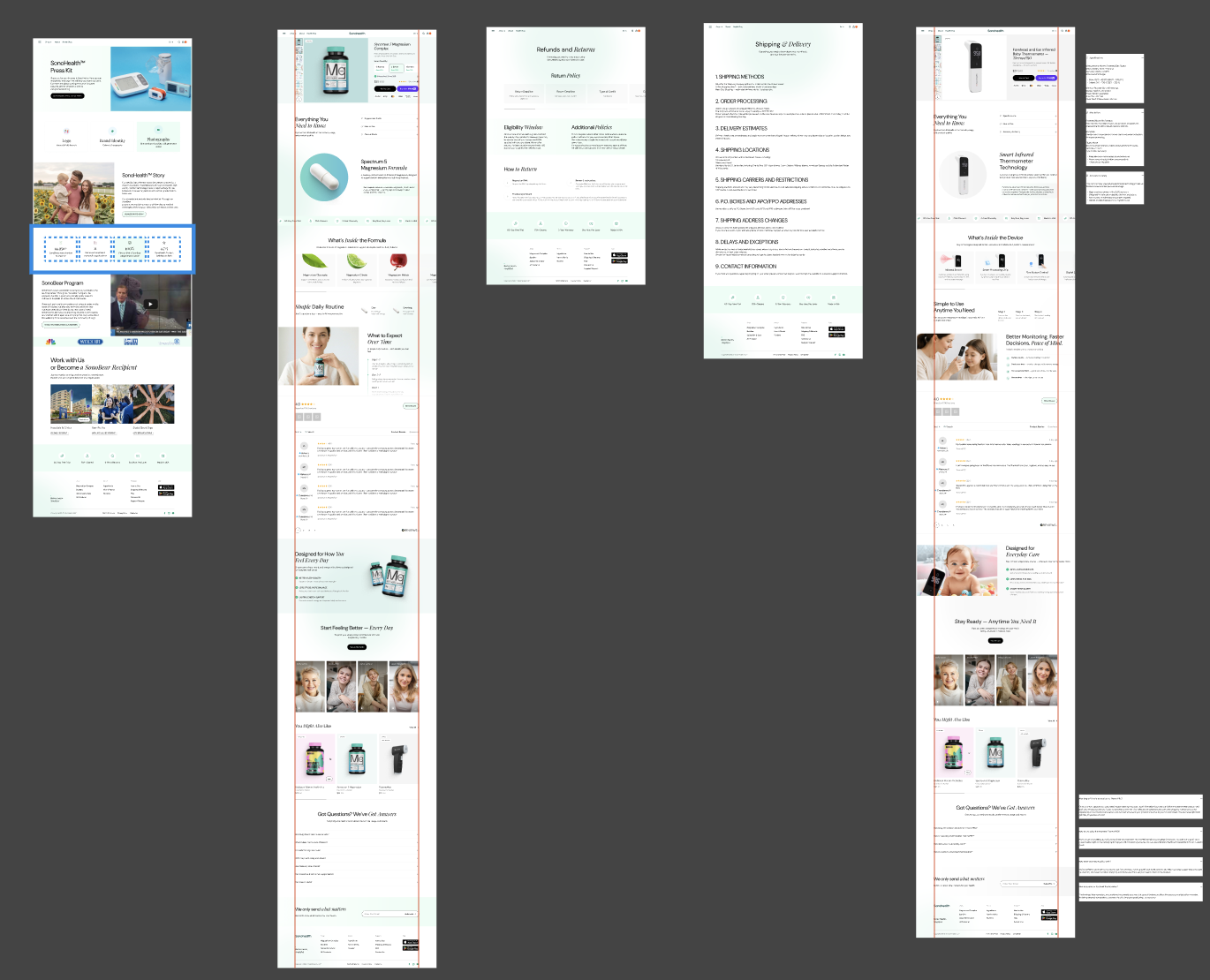
Type and grid. We set one typographic scale (headings, subheads, body, fine print) and a spacing system. The old site used different fonts and spacing on every page. Now the whole site runs on one grid, and that is the main thing that separates “premium” from “built in a hurry.”
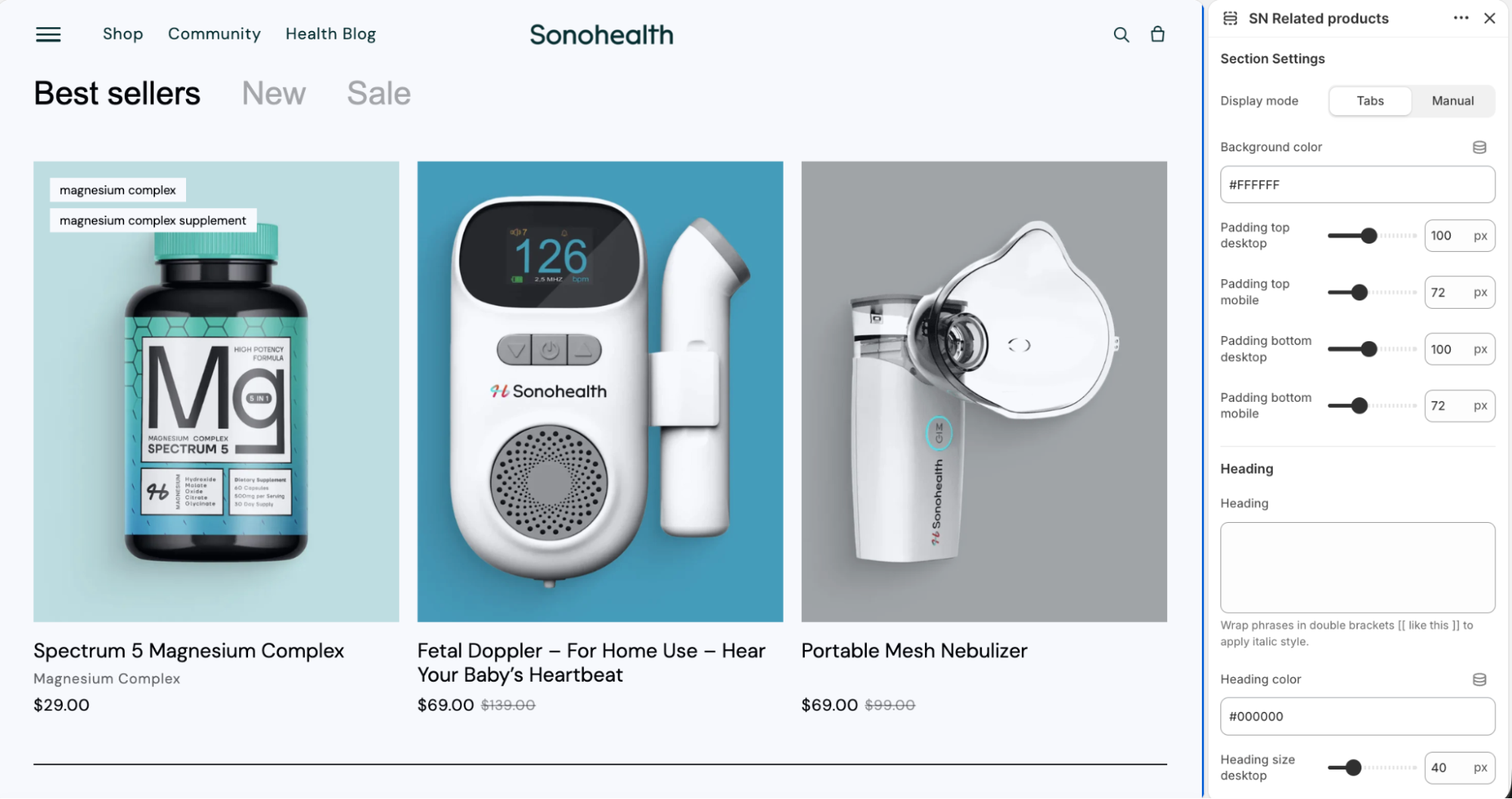
A design system, not a set of pages. We built a library of reusable sections: hero, product cards, review blocks, video, bestseller collections, trust badges, FAQ. Pages assemble from these like building blocks, with a guaranteed consistent visual language. That serves both the look and the client’s speed: a new page takes minutes to build, with no developer.
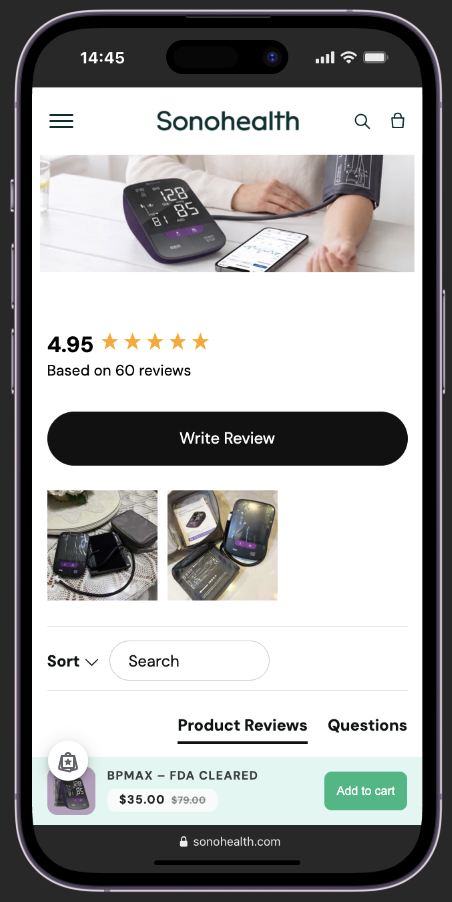
Trust, up front. For a health brand, trust is part of the product. We moved FDA-Cleared, 2-Year Warranty, 60-Day Free Trial, Made in USA, reviews, and video into the first screens, so reliability signals show before the scroll.
Mobile first. The 40+ audience increasingly buys on a phone, so every screen was designed mobile first: large readable type, easy buttons, fast load.
5. Development
We brought the Figma design into a customized Liquid theme. The principle was simple: build as much as possible natively in the theme rather than bolting a heavy app onto every small feature. That keeps the site faster and cheaper to maintain.
Custom sections instead of stock Dawn. Base Dawn is a starting point. We rebuilt the key sections for the brand and made them editable, so the client changes content and block order directly in the Shopify editor, with no developer and no code.
PDPs on metafields. Product pages run on a metafield system: one set of sections that fills with each product’s own data. That is the technical basis of the flexible PDPs, a shared design language with unique content per device. Metafields also give a clean data structure and make future catalog growth easier.
Sticky Add to Cart. The buy button sticks as the shopper scrolls. On long PDPs and on mobile that keeps the primary action in reach and cuts the drop-off on scroll. This is a custom theme change, not a third-party app.
Conversion elements from apps. On top of the theme we added a drawer cart with upsells (Kaching Cart), bundles and an in-card subscription option (Kaching Bundles plus Kaching Subscriptions), Sale/New and trust badges on cards (GSC Product Labels & Badges), and a review block at the decision point (REVIEWS.io).
Speed optimization. We tightened the site on three fronts: lazy loading images and video plus WebP conversion; removing extra scripts and render-blocking resources that slow first paint; and loading apps carefully so they do not sit dead weight on every page. For a health brand, speed is both visitor trust and a Google ranking factor.
6. Checkout: the most you can do without Shopify Plus
You can only fully redesign checkout on the Plus tier (around $2k a month). We deliberately did not push the client into an expensive plan, and instead got the most out of checkout on the standard theme:
- checkout branding (logo, colors, fonts to match the brand)
- payment-stage logic and rules through SMART Checkout Rules
- accelerators (Apple Pay, Google Pay) for one-tap purchase
- a third-party payment processor for high-risk categories (the nebulizer), so payments do not get blocked
The client got a polished checkout without overpaying for the tier.
Shop Pay: one-tap checkout
We also turned on Shop Pay, Shopify’s accelerated checkout. The logic is simple: fewer steps between “I want this” and “I bought it” means higher conversion, especially on mobile, where the 40+ audience increasingly buys.
Shop Pay runs on a shared identity network. If a shopper has ever paid with Shop Pay at any Shopify store, their address, shipping, and card are already saved. On SonoHealth they re-enter nothing and create no account. A one-time SMS code completes the order. Per Shopify’s own data, Shop Pay is roughly 4x faster than guest checkout and lifts conversion by up to 50%, and its presence on the button alone adds about 5% to lower-funnel conversion. It is free to enable; the store pays its standard Shopify Payments rate. For a health brand, where the purchase requires trust, removing steps at the finish line is a direct gain.
Note: the Shop Pay figures are Shopify’s internal numbers, so we frame them as “per Shopify’s data,” not as independent fact.
7. High-risk payments: selling a nebulizer on Shopify
This was a separate engineering problem. A nebulizer is a category that Shopify Payments restricts under its rules for medical devices. A naive launch risks a block or a payout freeze.
We connected a third-party payment processor ahead of time and configured payments so the client sells without the risk of a sudden stop. For medical e-commerce that is a critical detail most people miss until they hit it.
8. The operational stack: a working system, not just a site
Moving the pages is half the job. We rebuilt the operational back end so the store actually sells and fulfills:
- Subscriptions and AOV: Kaching Subscriptions for recurring supplement orders, Kaching Bundles and Kaching Cart for bundles and cart upsells.
- Reviews: REVIEWS.io for collecting and displaying social proof.
- Fulfillment: Packiyo (warehouse / 3PL) with ShipStation (shipping) and Track123 (a customer order-tracking page).
- Automation: Shopify Flow runs routine workflows on its own.
- Checkout: SMART Checkout Rules for payment-stage logic and limits.
Taken together, this is not “the site moved.” It is a rebuilt operating system for the store, from storefront to warehouse to tracking.
The results
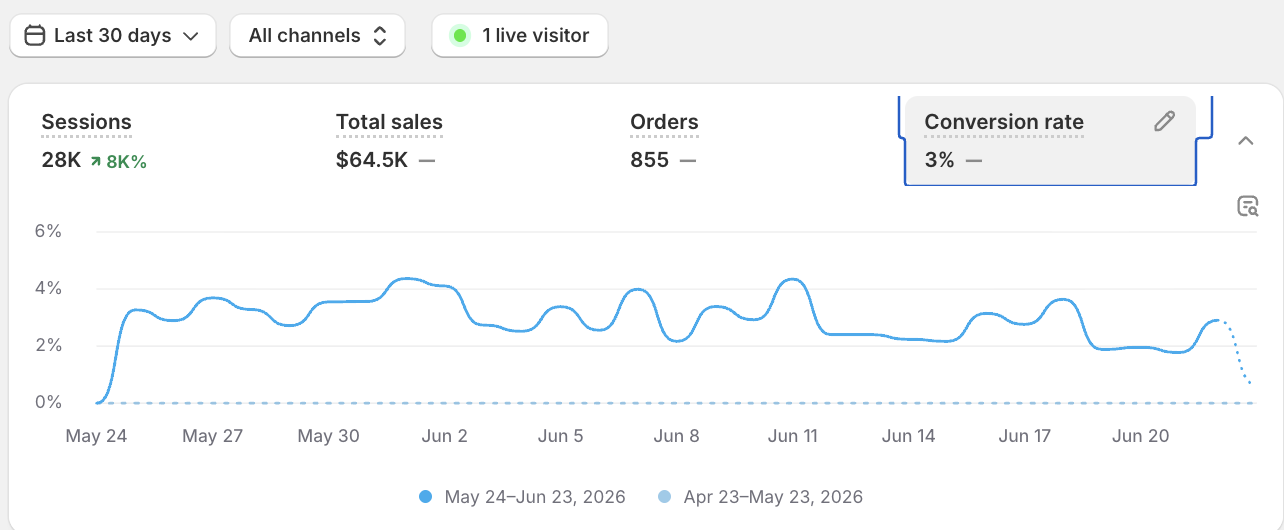
The store started selling right after launch:
- 3%+ conversion, a strong number for e-commerce and above the industry average.
- Steady orders and revenue from month one.
- SEO preserved and improved, with a noticeably faster site.
- A scalable platform with subscriptions, mobile apps, and automation.
What’s next
The migration is the foundation. We are now running the account further: building Meta creatives and managing ads, taking the client end to end, from platform and design to traffic and sales.
Why brands move from WordPress to Shopify
If you are weighing the same move, here is the short version:
| WordPress | Shopify | |
|---|---|---|
| Management | Needs a developer for almost everything | You manage it, no code |
| Security and hosting | Your responsibility, constant patching | Built in, PCI DSS, SSL, 24/7 |
| Speed | Depends on plugins and hosting | Fast out of the box, CDN included |
| Apps / plugins | Conflicts can break the whole site | Stable ecosystem on a solid base |
| Checkout | Plugin-dependent, clunky | Best-converting, Shop Pay one-tap |
| Scale | Limited by infrastructure | Subscriptions, apps, new markets |
Shopify takes a whole class of problems off the owner’s plate, security, updates, downtime, optimization, and leaves the part that matters: selling.
FAQ: WordPress to Shopify migration
Will I lose my SEO and Google traffic in the move?
No, when the WordPress to Shopify migration is done right. We build a map of every old URL and set 1:1 301 redirects so search equity transfers to the new addresses and visitors never hit a 404. After launch we submit the sitemap to Google Search Console and monitor indexing.
Will you move the blog and the comments?
Yes. On this project we moved all 330 posts with images, dates, table-of-contents layouts, and comments. We used a dedicated solution for comments, since Shopify’s native blog handles them only in a limited way.
How long does a WordPress to Shopify migration take?
It depends on the size of the catalog and content. This project (21 products, 40 pages, 330 posts, a redesign, and an operations rebuild) took about two months of design and development.
Do you migrate customer data and orders?
We can, but it is not always the right call. Here we deliberately started clean on accounts, to avoid carrying password and personal-data risk and to get clean analytics. We moved SEO, content, and catalog in full.
Can you sell restricted categories, like medical devices?
Yes. For categories that Shopify Payments restricts, we connect a third-party payment processor so payments work without blocks.
Is Shopify really more reliable than WordPress?
For most e-commerce, yes. Hosting, security, PCI, and updates sit with the platform, not with you. You stop worrying that the next plugin update takes the store down, and you spend your time selling.
Want the same?
d4.group replatforms stores from WordPress to Shopify without losing SEO or sales, from the redirect map and blog migration through redesign, development, and ad launch, end to end.